Tuesday, October 12, 2010


Working on my I.T. Masters Degree in Information Assurance
Education ain't cheap, even with Tuition Reimbursement! I am wondering if a Masters degree in I.T. is really even worth it? I mean, afterall, I get knowledge pay from my employer for every Industry Certification I get, but not for a Masters Degree! Not even for a Bachelors or Associates. Seems certs are where it's at.
So, what will a Masters get me? Possibly make me more marketable for Managerial positions? (Although as a teen I didn't like babysitting, so I doubt I will now). Maybe enable me to teach at the Community/Vocational College level? I'm just not sure. I'm also not sure if it's worth the time or the money. The money is a big issue, tuition for an out-of-state student is pretty outrageous! So I've been trying to come up with clever ways to make extra moolah. Here they are:
PS - I hope this post isn't in violation of E-Bloggers rules, whatever they are...
So, what will a Masters get me? Possibly make me more marketable for Managerial positions? (Although as a teen I didn't like babysitting, so I doubt I will now). Maybe enable me to teach at the Community/Vocational College level? I'm just not sure. I'm also not sure if it's worth the time or the money. The money is a big issue, tuition for an out-of-state student is pretty outrageous! So I've been trying to come up with clever ways to make extra moolah. Here they are:
- Ebay - yes, my whole life is pretty much for sale right now. Not only do I despise clutter (there's no quicker way to get me in the Looney Bin), but I need hard cold cash for my crap. One Geekette's crap is another's treasure, or so I hear. So, I will shamelessly post the URL to my Ebay store & hope Google brings a few customers my way: http://members.ebay.com/ws/eBayISAPI.dll?ViewUserPage&userid=squash_goddess
- Amazon - Amazon if often over-looked by Ebayers as a potential way to peddle your crap for cash. In this case, it's more like books and gadgets, which in all fairness probably shouldn't be referred to as crap. But, to a person such as myself, anything that's in your house & cluttering it up is crap. So there we have it. Another shameless URL coming your way: http://www.amazon.com/shops/squash_goddess
- Cyber-begging - Ever hear of this innovative way to make $$? A friend of mine needed a new video camera, a rather high-end one (she's an Indie movie producer). Her solution? Create a cyber-begging account, post it to Facebook, and shamelessly ask friend and acquaintences to donate via her linked Paypal account. Pretty kewl, I thought. I don't have a cyber-begging account yet, but if sales don't go well (please refer to my other 2 shameless URLs above), I just may have to stoop this low!
- Elance - Well, I did have an account with them but had no luck on the few proposals I posted. Also, Elance pissed me off by emailing me one day to announce that the account I haven't used in 3 years was in violation of the user policy. Apparently, I had a link in my profile to my web site (which, in my defense, was NOTHING more than an about me website! It didn't even contain links to my online stores!). Horrors! I emailed Elance back & told them to just get rid of my account & that I had no idea what they were talking about. Yeesh! Just thought I'd throw that out there for other folks who might be looking for other means of income. Elance is a great place to get extra $$, esp. if you are in technology or for "virtual assitants".
- Grants/Scholarships, etc - Well, this could be a viable solution since I have the GPA, but after looking around, I discovered that the majority of scholarships are either for people with very specialized skills, without any degree to begin with (like, you are a single mother of 6+ kids with only a high school diploma), or are some rare species of human. I have a degree, my only skill is playing with PCs, & I'm a white female (with a touch of Native American). Wah.
PS - I hope this post isn't in violation of E-Bloggers rules, whatever they are...
Monday, April 12, 2010
Searches using Online Forms with Wildcards - Forcing Required Name Fields to return Everyone with the Same Lastname
Ran across this gem recently while searching for information on a local site via a form. This particular form required that you enter a lastname & a firstname in order to return any records. Knowing that this form is connected to a database, I got lazy and decided to try wildcard characters for firstname (ok, I admit, I didn't know the firstnames for the records I was looking for). So, for Firstname I tried: * This didn't work. Next I tried another common wildcard character: % That didn't work either. So, it occured to me to try: **
This worked! The database returned all the records for the Lastname I was searching. Not sure why * didn't work, but I figured maybe the form wasn't passing the * by itself, and putting ** forced it to pass the wildcard to the database?? Any ideas on this?
I also wonder if the webmaster intended on folks being able to search on Lastname alone? :-O
This worked! The database returned all the records for the Lastname I was searching. Not sure why * didn't work, but I figured maybe the form wasn't passing the * by itself, and putting ** forced it to pass the wildcard to the database?? Any ideas on this?
I also wonder if the webmaster intended on folks being able to search on Lastname alone? :-O
Tuesday, March 23, 2010
Can't Log Into Router's IP: 192.168.1.1
Came across a problem recently where I couldn't log into my Router's IP to access the Router settings. I was previously able to access from my HP running WinXP Pro (IE 6.0.2900.5512), then suddenly was getting this page:

I tried to access the Router from my Gateway Netbook and was able. Hmmm...
Later in the evening, I tried to access the Router again on my Netbook & could not. So, I thought about what had happened between earlier, when I could access the router, & later, when I could not. I had recently applied Windows updates.
I recalled at work where we were accessing a MS Access application (Data Access Page) across the company intranet. Everytime we had a problem accessing it, it was due to Windows updates where IE was affected. To fix it, we had to go into Tools>Internet Options>Security>Local Intranet>Sites>Advanced, and add the URL as a trusted site. Then we could access it. But everytime an update was applied to IE, we had to re-add it.
So, I figured what the heck, esp. knowing updates were recently applied. On my HP (IE 6.0), I added the IP to my list of trusted sites on the intranet.


After adding the Routers IP address to the list of trusted Intranet sites, I was able to access the router.

Later in the evening, I tried to access the Router again on my Netbook & could not. So, I thought about what had happened between earlier, when I could access the router, & later, when I could not. I had recently applied Windows updates.
I recalled at work where we were accessing a MS Access application (Data Access Page) across the company intranet. Everytime we had a problem accessing it, it was due to Windows updates where IE was affected. To fix it, we had to go into Tools>Internet Options>Security>Local Intranet>Sites>Advanced, and add the URL as a trusted site. Then we could access it. But everytime an update was applied to IE, we had to re-add it.
So, I figured what the heck, esp. knowing updates were recently applied. On my HP (IE 6.0), I added the IP to my list of trusted sites on the intranet.


After adding the Routers IP address to the list of trusted Intranet sites, I was able to access the router.
I'm now wondering if I'll have to do this everytime there's a new patch/hot fix, etc that involves IE...
Interesting note...after adding 192.168.1.1 as a trusted site on the intranet on my HP, I was also then able to access it from my Gateway Netbook (WinXP Home/IE 8).
Sunday, March 21, 2010
Activating ACL (Security tab) for files & folders in WinXP Pro & Home
Just thought I'd share this gem from my Security+ studies...
WinXP Pro:
By default, Windows XP uses "simple file sharing". Simple file sharing hides the ACL (Access Control List) which gives you granular security control over who can access what folders & files on your system.
With simple file sharing enabled, the Security tab will not be present.

To "unhide" ACL, open any folder and from the menu go to Tools>Options, select the View tab, and clear the "Use simple file sharing" box. Click Apply & OK.

You should now see a Security tab when you go to the File/Folder properties.
 For more granular control over permissions, etc., click the Advanced button.

WinXP Home:
The "Use simple file sharing" option is not available under the View tab in XP Home, but you can boot to Safe Mode (hit F8 while booting up, for Gateways anyway...this may differ by PC), choose "Safe Mode with Networking". When you right-click on a file or folder, the Security Tab will be present (but the option to deselect "Use simple file sharing" will still be missing).
If you want to see the Security tab without having to boot to Safe-mode, go to Microsoft's site & download & extract the file SCESP4I.EXE from here: ftp://ftp.microsoft.com/bussys/winnt/winnt-public/tools/SCM
or here:
http://support.microsoft.com/kb/195227/EN-US/
To install:
After you extract the files, go to the folder where you extracted them & find the file: Setup.inf . Right-click and select Install. Reboot the system & you should now see the "Security Tab" under file/folder properties.
I tried this on my own WinXP Home Netbook & it works just fine.
WinXP Pro:
By default, Windows XP uses "simple file sharing". Simple file sharing hides the ACL (Access Control List) which gives you granular security control over who can access what folders & files on your system.
With simple file sharing enabled, the Security tab will not be present.

To "unhide" ACL, open any folder and from the menu go to Tools>Options, select the View tab, and clear the "Use simple file sharing" box. Click Apply & OK.

You should now see a Security tab when you go to the File/Folder properties.
 For more granular control over permissions, etc., click the Advanced button.
WinXP Home:
The "Use simple file sharing" option is not available under the View tab in XP Home, but you can boot to Safe Mode (hit F8 while booting up, for Gateways anyway...this may differ by PC), choose "Safe Mode with Networking". When you right-click on a file or folder, the Security Tab will be present (but the option to deselect "Use simple file sharing" will still be missing).
If you want to see the Security tab without having to boot to Safe-mode, go to Microsoft's site & download & extract the file SCESP4I.EXE from here: ftp://ftp.microsoft.com/bussys/winnt/winnt-public/tools/SCM
or here:
http://support.microsoft.com/kb/195227/EN-US/
To install:
After you extract the files, go to the folder where you extracted them & find the file: Setup.inf . Right-click and select Install. Reboot the system & you should now see the "Security Tab" under file/folder properties.
I tried this on my own WinXP Home Netbook & it works just fine.
Monday, November 16, 2009
Windows - No Disk Error Message: Exception Processing Message c0000013 Parameters 75b6bf7c...

I was getting this message recently on my Acer Netbook, which is currently serving as a "print server". Every few seconds, this annoying dialog box would pop up. At first I thought it was just an Acer thing until this morning, when I fired up my HP Desktop, to my surprise, I received the same annoying dialog box.
Well, since it started with the Acer, which I'm using as a print server, & now it's showing up on my HP Desktop, I took the next logical step & thought of what the 2 had in common...a USB thumb drive.
Since my WiFi feature of my printer failed, I had hooked up my Acer Netbook to the printer via USB, and to print documents, I had been placing the documents on my thumb drive, & plugging them into my Acer, & printing from there (for those documents I didn't feel like placing out on the web in my Google doc storage space). Soooo.....it seemed to me this message must be related to documents I had been transferring to the thumb drive. "Windows - No Disk" must be referring to the USB thumb drive which is no longer plugged in.
Next logical question. Why is the system still looking for this document? Why would it be trying to locate it? Only thing I could think of that would trying to be accessing a document at boot-up would be. My Recent Documents.
So, I took the following steps which seemed to have partially fixed the problem. Baically, I cleared "My Recent Documents". (See below for other part of solution) Here's How:
Go to Start > Control Panel > Taskbar and Start Menu > Start Menu Tab> Customize button > Advanced Tab> Recent Documents section > "List my most recently opened documents" section > Clear button

Note: If you don't have Control Panel in your Start Menu (I like it there, I find it convenient), you can turn it on by following these steps:
Show Control Panel in Start Menu (XP):
Right-click the Start button, select Properties, under Start Menu items, under Control Panel, select the "Display as link" radio button

Note:
You can also clear the check box for "List my most recently opened documents" if you don't want your most recently opened documents displayed (or viewed by others sharing your PC).
Other part of solution:
My HP Desktop has a floppy drive. When I was running one of my favorite system maintenance programs, I saw the error again. The application was performing a short-cut clean-up, & found short-cuts referencing files on the A: drive (Floppy Drive). Of course, there was no floppy in the drive at the time. This caused the same error, so, presumably, ANY software trying to access these shortcuts (or you, if you clicked on the shortcut) would cause this same error message.
So to get rid of these shortcuts, do the following steps:
1. Go to C:\Documents and Settings\
Here you will find other short cuts not cleared out by the "Clear Recent Documents" button. Click on the properties of each until you find a shortcut pointing to the A: Drive (floppy drive)or any removed media. Delete this short-cut. It is only a short-cut, so it is OK to delete.

2. Go to the recycle bin. The things you deleted will now be in here, so right-click the recycyle bin & choose "Empty Recycle Bin" or "Clean Recycle Bin", whichever yours says, to empty the short-cuts from the recycle bin. Deleting the files forever, at least until a forensics examiner gets a hold of your hard drive...
To get rid of the error:
1. Clean out most recent documents in the start Menu
2. Go to C:\Documents and Settings\
3. Empty the Recycle Bin
Wednesday, September 30, 2009
Enabling the Wireless Adapter for Ubuntu
Just so I don't forget again (which is easy to do when you have been away from Ubuntu for a bit). To enable your wireless adapter:
At the Terminal:
sudo su
ifconfig wlan0 up
At the Terminal:
sudo su
ifconfig wlan0 up
Tuesday, September 08, 2009
Acer Flat screen monitor says "No Signal" and light turns orange when plugged into an IBM Thinkpad Laptop
Well, I feel like an idiot...my monitor was giving me a "No Signal" message when I plugged it into my laptop (port on laptop, not the docking station). After trying a few things, like unplugging the monitor, holding the on button in for a bit, the usual things you would try, it occurred to me to right-click the desktop & check properties>settings, and make sure I had multiple monitors selected. I didn't, so, while I had the monitor plugged into the laptop, I checked the "Extend my Windows desktop onto this monitor" checkbox, & voila (or viola as some would say), I had my monitor. Yeesh.
Saturday, August 22, 2009
External USB Hard Drive not showing in My Computer but is in Device Manager
Another useful old post. I actually run into this quite a bit, so have a shortcut to Disk Management on my desktop:
Heehee...this one made me feel like an idiot...I bought a 120 G External USB HD, & connected it to my laptop. For some reason it wouldn't show in My Computer. This perplexed me since I could see the drive in Device Manager & everything looked ok. Then I noticed the drive letter it was assigned - G:
Hmmmm...same as one of my mapped drives set to reconnect at logon. Duh...problem solved - assigned my mapped drive a different letter & voila (or viola as some would say), I could see my drive. That was 20 minutes of my day wasted, but at least it provided me with a bit of humor.
http://techrepublic.com.com/5208-6230-0.html?forumID=102&threadID=239428&start=0
How to reassign a drive letter:
To change an existing drive letter on a drive, on a partition, or on a volume, follow these steps:
1. Log on as Administrator or as a member of the Administrators group.
2. Click Start, click Control Panel, and then click Performance and Maintenance.
3. Click Administrative Tools, double-click Computer Management, and then click Disk Management in the left pane.
4. Right-click the drive, the partition, the logical drive, or the volume that you want to assign a drive letter to, and then click Change Drive Letter and Paths.
5. Click Change.
6. Click Assign the following drive letter if it is not already selected, click the drive letter that you want to use, and then click OK.
7. Click Yes when you are prompted to confirm the drive letter change.
The drive letter of the drive, the partition, or the volume that you specified is changed, and the new drive letter appears in the appropriate drive, partition, or volume in the Disk Management tool.
http://support.microsoft.com/kb/307844
Heehee...this one made me feel like an idiot...I bought a 120 G External USB HD, & connected it to my laptop. For some reason it wouldn't show in My Computer. This perplexed me since I could see the drive in Device Manager & everything looked ok. Then I noticed the drive letter it was assigned - G:
Hmmmm...same as one of my mapped drives set to reconnect at logon. Duh...problem solved - assigned my mapped drive a different letter & voila (or viola as some would say), I could see my drive. That was 20 minutes of my day wasted, but at least it provided me with a bit of humor.
http://techrepublic.com.com/5208-6230-0.html?forumID=102&threadID=239428&start=0
How to reassign a drive letter:
To change an existing drive letter on a drive, on a partition, or on a volume, follow these steps:
1. Log on as Administrator or as a member of the Administrators group.
2. Click Start, click Control Panel, and then click Performance and Maintenance.
3. Click Administrative Tools, double-click Computer Management, and then click Disk Management in the left pane.
4. Right-click the drive, the partition, the logical drive, or the volume that you want to assign a drive letter to, and then click Change Drive Letter and Paths.
5. Click Change.
6. Click Assign the following drive letter if it is not already selected, click the drive letter that you want to use, and then click OK.
7. Click Yes when you are prompted to confirm the drive letter change.
The drive letter of the drive, the partition, or the volume that you specified is changed, and the new drive letter appears in the appropriate drive, partition, or volume in the Disk Management tool.
http://support.microsoft.com/kb/307844
Maxtor One Touch III Mini - Solution to EasyManage Crash on Windows XP
This is one of my older posts from the Maxtor forums which I thought was worthy of posting here...
I have had the problem with the error message: "Maxtor EasyManage has encountered a problem and needs to close. Please inform Microsoft about this." with the Maxtor Easy Touch III, and tried the compatibility solution (setting EasyManage to run in W2000 compatibility mode). This worked, but, curiously, only for a while. I recently plugged my harddrive in to backup my work data, and started to get the error message again. I verified that the compatibility check box was checked, & windows 2000 selected...still had the problem.
I decided to try the other options, and selected the "Turn off advanced text services for this program", selected Apply, OK, and the error went away. Not sure what that check box is for, but I wonder if it depends upon a service that was not running and so threw the error?
Anyway, in my case I needed the "Compatibility mode" check box and the "Turn off advanced text services for this program" check box selected to make this error go away.
Windows XP SP2
Administrator account
http://forums.seagate.com/stx/board/message?board.id=onetouch&message.id=5138#M5138
I have had the problem with the error message: "Maxtor EasyManage has encountered a problem and needs to close. Please inform Microsoft about this." with the Maxtor Easy Touch III, and tried the compatibility solution (setting EasyManage to run in W2000 compatibility mode). This worked, but, curiously, only for a while. I recently plugged my harddrive in to backup my work data, and started to get the error message again. I verified that the compatibility check box was checked, & windows 2000 selected...still had the problem.
I decided to try the other options, and selected the "Turn off advanced text services for this program", selected Apply, OK, and the error went away. Not sure what that check box is for, but I wonder if it depends upon a service that was not running and so threw the error?
Anyway, in my case I needed the "Compatibility mode" check box and the "Turn off advanced text services for this program" check box selected to make this error go away.
Windows XP SP2
Administrator account
http://forums.seagate.com/stx/board/message?board.id=onetouch&message.id=5138#M5138
Saturday, August 15, 2009
Enabling Sound on Ubuntu after Upgrade to ver 9.0.4
After many fits getting my Ubuntu install to play nice by installing wireless/sound drivers, I decided to upgrade from ver 8.x to 9.0.4 (Jaunty Jackalope?). After installing/rebooting the system, I discovered my sound no longer worked. Verifying that the speakers were on & plugged into the sound card (simple crap first), I reported the bug to Ubuntu. After that, I tried reinstalling the drivers by going to "Terminal" (Ubuntu's Command Line), & entered:
sudo su
(password)
cd (directory where sound card lives)
make
make install
I rebooted...
Still no sound, so I hit the internet again & found a troubleshooting guide here: https://wiki.ubuntu.com/Bugs/FindRightPackage
which led me here:
https://wiki.ubuntu.com/DebuggingSoundProblems
Being new to Ubuntu, I'm still floundering, so all you seasoned Ubuntu dudes & dudettes are probably laughing your asses off right now. After going through this useful guide, I made my way down to the "Checking permissions and resources" (hello!)
I went to: System>Preferences>Sound, and found that my permissions to use "Audio Devices" was unchecked.
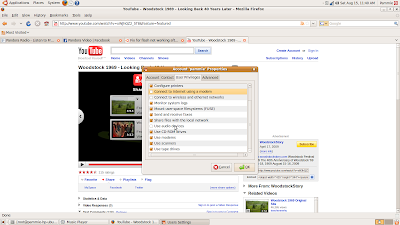
Of course, I didn't have permissions to change my permissions, which led to another discovery. There is, in this same dialog box, an Unlock button. Hmmm...Unlock what, I wondered, so of course I clicked it. It asked me for my Password, I entered it, & voila (or viola as some would say), I now had the ability to change my permissions. In fact, I gave myself permissions to everything (I've been known to be generous).
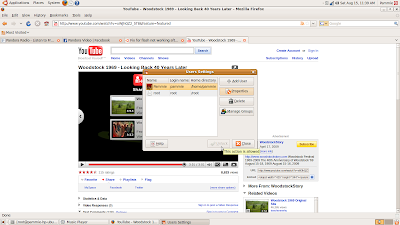
I rebooted.
I now have sound, AND, the upgrade seemed to fix my browser woes (couldn't get YouTube, Pandora to work before).
sudo su
cd (directory where sound card lives)
make
make install
I rebooted...
Still no sound, so I hit the internet again & found a troubleshooting guide here: https://wiki.ubuntu.com/Bugs/FindRightPackage
which led me here:
https://wiki.ubuntu.com/DebuggingSoundProblems
Being new to Ubuntu, I'm still floundering, so all you seasoned Ubuntu dudes & dudettes are probably laughing your asses off right now. After going through this useful guide, I made my way down to the "Checking permissions and resources" (hello!)
I went to: System>Preferences>Sound, and found that my permissions to use "Audio Devices" was unchecked.

Of course, I didn't have permissions to change my permissions, which led to another discovery. There is, in this same dialog box, an Unlock button. Hmmm...Unlock what, I wondered, so of course I clicked it. It asked me for my Password, I entered it, & voila (or viola as some would say), I now had the ability to change my permissions. In fact, I gave myself permissions to everything (I've been known to be generous).

I rebooted.
I now have sound, AND, the upgrade seemed to fix my browser woes (couldn't get YouTube, Pandora to work before).
Saturday, January 17, 2009
Enabling Windows Vista Home Premium's default Administrator Account
OK, this was irritating me from the git-go, so I did some research & found out how to enable the built-in administrator account in Windows Vista Home Premium. Here's the easiest way:
Goto Start>right click the COMMAND PROMPT shortcut and select "run as administrator"
Enter & run the following command to enable the Administrator account:
net user administrator /active:yes
Log into the Administrator Account & create a password. The end.
More on the built-in Administrator Account:
http://technet.microsoft.com/en-us/library/cc766343.aspx
http://searchenterprisedesktop.techtarget.com/tip/0,289483,sid192_gci1254063,00.html
Goto Start>right click the COMMAND PROMPT shortcut and select "run as administrator"
Enter & run the following command to enable the Administrator account:
net user administrator /active:yes
Log into the Administrator Account & create a password. The end.
More on the built-in Administrator Account:
http://technet.microsoft.com/en-us/library/cc766343.aspx
http://searchenterprisedesktop.techtarget.com/tip/0,289483,sid192_gci1254063,00.html
Wednesday, January 07, 2009
Error updating Free AVG (ver. 8.0) - Invalid update control CTF file
Free AVG is my favorite anti-virus/anti-spyware application. It's light, easy to configure, and best of all, free.
Recently, I noticed an exclamation point over the AVG icon in the system tray. (AVG ver 8.0.176. OS Windows Vista Home Premium, ver 6.0, build 6001), Opening the AVG User Interface (right-click the AVG icon in the system tray), I noticed the latest virus definition updates were marked as not being updated. I clicked the "Update Now" menu button, but received an error message when the application tried to update itself. The error read: "Invalid update control CTF file". I went to the AVG website, & found the fix which resolved the problem. Click on this linkto read more: http://free.avg.com/faq.num-1567?srch=filecorruption#faq_1567 & download/save the following executable: deleteupdatefiles.exe.
The error message makes the problem pretty obvious (which is a rare thing, usually error messages reveal nothing except confusion), the update control files are corrupted. These files need to be deleted, and during AVG's next attempt to update, new control files should be downloaded/created and update process should complete.
Recently, I noticed an exclamation point over the AVG icon in the system tray. (AVG ver 8.0.176. OS Windows Vista Home Premium, ver 6.0, build 6001), Opening the AVG User Interface (right-click the AVG icon in the system tray), I noticed the latest virus definition updates were marked as not being updated. I clicked the "Update Now" menu button, but received an error message when the application tried to update itself. The error read: "Invalid update control CTF file". I went to the AVG website, & found the fix which resolved the problem. Click on this linkto read more: http://free.avg.com/faq.num-1567?srch=filecorruption#faq_1567 & download/save the following executable: deleteupdatefiles.exe.
The error message makes the problem pretty obvious (which is a rare thing, usually error messages reveal nothing except confusion), the update control files are corrupted. These files need to be deleted, and during AVG's next attempt to update, new control files should be downloaded/created and update process should complete.
Sunday, September 21, 2008
Hmmm....
Hmmmm....
- 10:11 Tweeting from MySpace... #
- 10:27 This is interesting. I can send "tweets" to Twitter, then connect Twitter to my Blogger account # #
Saturday, September 20, 2008
Sunday, February 17, 2008
Playing with Pendrivelinux
Always intrigued by alternative operating systems, I decided to play with Pen Drive Linux this weekend...a portable open source operating system which can be booted to from a USB flash drive, or can be run from within Windows without rebooting (for those whose BIOS doesn't support booting from a USB flash drive), from a "virtual machine" environment. It is way cool!
Initially, I tried to get Pen Drive Linux to boot from my thumbdrive, after downloading & extracting Pendrivelinux08.zip to my USB Flash Drive & running the makeboot.bat file, as per their instructions found at:
http://www.pendrivelinux.com/2008/02/13/pendrivelinux-2008-install-from-windows/.
I went into the BIOS and selected USB Flash Drive as my primary boot device, & also enabled the External Boot Device option. However, when I rebooted my laptop (Sony Vaio) it still booted to Vista. I even tried starting the boot further back (cold boot), but it still went to Vista. I verified that the file needed to boot to Linux was in the root of my thumb drive, it was. I must be doing something wrong...I'll figure it out later.
Anyway, I am currently entering this blog from within Pen Drive Linux. What I discovered after some poking around, is that there is also a download which enables you to launch Linux from within Windows, without having to reboot. This is just what I needed. :) I downloaded Qemupdlv1.0.1.exe from
http://www.pendrivelinux.com/2007/09/19/portable-qemu-persistent-pendrivelinux/
and extracted it to my thumb drive (2G SanDisk Cruzer) to the Qemupdl folder. I ran the LaunchPDL.bat file and here I am.
It gives me something fun & different to play with. Here are some screenshots:
Initially, I tried to get Pen Drive Linux to boot from my thumbdrive, after downloading & extracting Pendrivelinux08.zip to my USB Flash Drive & running the makeboot.bat file, as per their instructions found at:
http://www.pendrivelinux.com/2008/02/13/pendrivelinux-2008-install-from-windows/.
I went into the BIOS and selected USB Flash Drive as my primary boot device, & also enabled the External Boot Device option. However, when I rebooted my laptop (Sony Vaio) it still booted to Vista. I even tried starting the boot further back (cold boot), but it still went to Vista. I verified that the file needed to boot to Linux was in the root of my thumb drive, it was. I must be doing something wrong...I'll figure it out later.
Anyway, I am currently entering this blog from within Pen Drive Linux. What I discovered after some poking around, is that there is also a download which enables you to launch Linux from within Windows, without having to reboot. This is just what I needed. :) I downloaded Qemupdlv1.0.1.exe from
http://www.pendrivelinux.com/2007/09/19/portable-qemu-persistent-pendrivelinux/
and extracted it to my thumb drive (2G SanDisk Cruzer) to the Qemupdl folder. I ran the LaunchPDL.bat file and here I am.
It gives me something fun & different to play with. Here are some screenshots:

My stats browsing to my blog using the Pen Drive Linux OS & the Gnome browser Epiphany:

So much for today's fun! It is a glorious day out & I'm finally feeling a bit better from my flu. Time to go outside and take in some sunshine. :)
Monday, February 04, 2008
Live Writer Tests
Just playing with Windows Live Writer. Some of the software in the table below is considered to be a "virus/trojan" by some virus scanning applications. I use all except for ScramDisk - which I added to the list just because it looks interesting to try...I'd like to see if I can recover the files it "scrambles".
| ScramDisk | http://www.scramdisk.clara.net/ |
| Pretty Good Privacy | http://www.pgpi.org/ |
| TrueCrypt - Encryption | http://www.truecrypt.org/ |
| NetCat - Networking Utility | http://netcat.sourceforge.net/download.php |
| Ethereal - Protocol Analyzer | http://www.ethereal.com/download.html |
| Back Orifice - Network Administrative Tool | http://www.bo2k.com/software/index.html |
Live Writers insert map feature. The random location I picked happens to be a military installation someplace in the SouthEast. I also added a caption.
Insert Tag feature:
del.icio.us Tags: Whiteman air force base,southeast us,freeware,netcat,ethereal,back orifice,forensics tools,data forensics,hacking tools
Photo Editing feature - including watermarks, effects, and other advanced editing tools:
My annual donation & good deed...adopting the little feller above to help with the efforts to save the Orangutans. His name is "Sen".
This blog was created using Windows freeware application, "Live Writer".
Testing Blogging With Live Writer
A free encryption software program that is the de-facto global standard for E-mail and file privacy. Pretty Good Privacy (or PGP) offers full-strength, 128-bit encryption. PGP has constantly been upgraded over the years and now offers loads of useful features, including secure file wiping; advanced keyserver searching; and seamless integration with Qualcomm's popular Eudora E-mail client. There's also an E-mail plugin for Microsoft Outlook/Exchange and Claris Emailer. Available for Windows, Macs, DOS and Unix. (Free for noncommercial use only).
- U.S. law prohibits export of PGP to non-U.S. residents. However, there is now an "International" version of PGP, compiled and developed outside the U.S., which is available for non-U.S. residents to download. It's available here.
Other Privacy software:
Subscribe to:
Posts (Atom)


